Complementary to the tools that allow you to execute quantum optimization algorithms on QPU (see LR-QAOA benchmark in the Data Sheet), Haiqu SDK offers utility functionality to perform classical postprocessing of the results acquired from a QPU when solving an optimization problem. Here is how your workflow might look:
1

Define your optimization problem

First, you need to define your optimization problem. Haiqu currently supports the quadratic unconstrained binary optimization (QUBO) problems that can be initialized with the corresponding class:
from haiqu.optimization import QUBO

# the problem can be initialized from a CPLEX/LP file
problem = QUBO.from_file("FILEPATH.lp")
If defining a problem from scratch, you can also initialize from a graph object using QUBO.from_graph() or QUBO.from_hamiltonian() if you already have a Hamiltonian defined.
2

Execute the workload on hardware

Whether you are using your own method or constructing an LR-QAOA circuit with Haiqu, you need to execute the circuit on a device or simulator using haiqu.run:
from haiqu.solver import build_LR_QAOA_circuit

circuit = build_LR_QAOA_circuit(problem)

job = haiqu.run(circuit, shots=1000, backend_name="aer_simulator")

raw_counts = job.result()[0]
3

Postprocess the counts classically

After retrieving the sampled bitstrings from the QPU, you may want to postprocess the results using a classical algorithm (e.g. a local bitflip search):
from haiqu.optimization import postprocessing

# Compute raw costs using the QUBO object
raw_costs = {bitstring: optimization_problem.global_cost(bitstring[::-1], formulation="ising") 
             for bitstring in raw_counts.keys()}

# Apply postprocessing with bitflip_search
processed_costs, processed_counts = postprocessing(
    counts=raw_counts,
    problem=optimization_problem,
    local_search_method=bitflip_search,  # Can be replaced with custom local search
    reverse_string=True,
    K=1,
    formulation="ising"
)

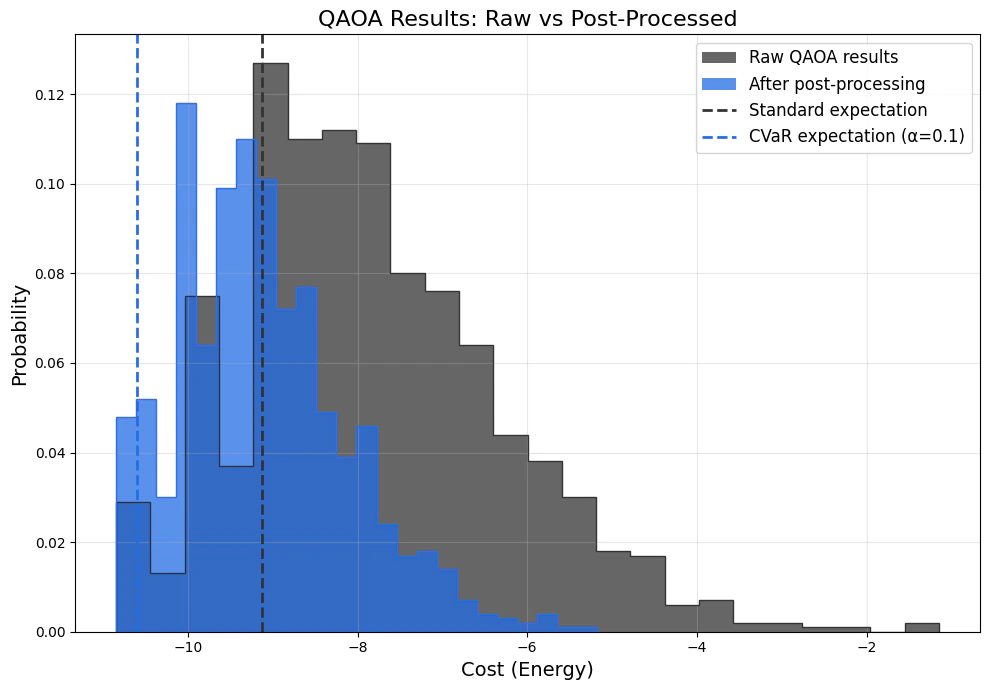
standard_expectation = CVaR_expectation(raw_counts, optimization_problem, alpha=1.0)
cvar_10_percent = CVaR_expectation(raw_counts, optimization_problem, alpha=0.1)
Here is how postprocessing might affect your QPU results: 21b0c7cf-cbed-433a-9459-8514b7e065ab.png