

v1.7.0
Haiqu v1.7.0
More device support, more flexible hybrid workflows, and greater control over data loading.- Optimize circuits on square-lattice devices with State Compression support for IBM and IQM hardware.
- Run hybrid programs on IBM devices outside the standard device list, including devices such as ibm_quebec when accessible to your account.
- Combine statevector execution with other device layers in hybrid programs.
- Check the condition of your Haiqu SDK environment with haiqu.health_check.
- Configure data loading synthesis consistently across all supported loading methods.
- Upgrade to Qiskit 2.5, expanding compatibility with the latest supported Qiskit version.
Compress circuits across more device architectures
State Compression now supports square lattices on IBM and IQM devices, expanding the range of hardware architectures you can target with device-aware circuit optimization. For more information, see: https://docs.haiqu.ai/core_features/compression#device-topology-aware-compression.Build more flexible hybrid programs
Hybrid programs now supportStatevectorLayer, allowing workflows to include statevector execution alongside other device layers. Haiqu automatically lowers flows to the layers required by the target device and adds a statevector terminal where needed. You can also run hybrid jobs on IBM devices that are accessible through your IBM Quantum account, even when those devices are not included in the standard device list. For more information, see: https://docs.haiqu.ai/hybrid/overview.Check SDK health and work with more circuit gates
The newhaiqu.health_check method lets you check service health directly through the SDK. HaiquCircuit also supports extended gate handling, with Haiqu gates unrolled into Qiskit-compatible circuits during construction. Circuit drawing now supports the return_artifact argument, and new dashboard deep linking makes it easier to navigate from the SDK to relevant dashboard views.Enjoy additional improvements
- The Dashboard now automatically refreshes job statuses, credit balances, and circuit information, helping you keep track of your experiments without manually refreshing the page.
- The SDK also includes several usability and reliability improvements. IBM Quantum credentials are validated before run submission to help catch authentication issues early. Transpilation options are validated client-side before submission, and
seed_transpileris now an explicit argument, giving you more control over reproducible transpilation workflows. - Circuit compatibility has been improved by fixing transpilation issues for targets with non-standard operations.
- Haiqu has been updated to Qiskit 2.5 across the SDK, REST API, Analytics, Dashboard, Quantum Flow, and compression components. QPY 17 support has also been added.
v1.6.0
Haiqu v1.6.0
Broader problems, freer objectives, richer measurements.- Solve higher-order binary optimization problems, not just QUBOs.
- Minimize nonlinear objectives over several observables on hardware.
- Read circuits out in arbitrary Pauli bases.
- Tune error mitigation component by component in variational runs.
Optimize beyond QUBO
The optimization stack now takesqiskit_addon_opt_mapper.problems.OptimizationProblem as its public problem type, and accepts native higher-order (HUBO) objectives alongside quadratic ones — no manual reduction to QUBO and no auxiliary variables. Build the objective with OptimizationProblem.minimize(higher_order=...), then pass it to haiqu.build_lr_qaoa_circuit, optionally haiqu.state_compression, and on through haiqu.run and haiqu.postprocess exactly as before.Solvers always minimize; a maximize problem is converted internally, and the costs returned by postprocess are evaluated against your original objective. Constrained models are penalty-folded explicitly with the new helpers haiqu.sdk.optimization.is_constrained and to_unconstrained_problem, so you always see the model that was actually solved. from_hamiltonian, evaluate_problem_cost, has_higher_order, max_pauli_weight and validate_optimization_problem round out the new public surface.Deprecated in this release: the haiqu.sdk.optimization.QUBO class and haiqu.solve_qubo. Both keep working — solve_qubo is now a thin wrapper over the modular path — and will be removed no sooner than three months after this release. Community qiskit-optimization types (QuadraticProgram, its from_docplex_mp) are deprecated as inputs as well.For more information, see: https://docs.haiqu.ai/reference/optimization/problem.Minimize nonlinear losses on device
haiqu.variational_optimization now accepts a NonlinearVariationalProblem, so a loss can be any sympy expression over several named observables — "(x - y)**2", "x*y", ratios — not just the expectation value of a single observable. Construct it with an ansatz, a loss expression, and a dictionary mapping each symbol in that expression to its observable terms.The default optimizer is now COBYLA (ScipyOptimizerOptions(method="cobyla")), which assumes no structure in the loss and is therefore valid for every objective. NFT remains available via NFTOptimizerOptions and still converges in fewer evaluations on an affine loss; passing it with a nonlinear one now raises ValueError rather than returning a converged-looking but wrong result. Cost estimation stays NFT-only, so dry_run=True keeps using NFT — with a warning that it prices an optimizer the run itself would not use — and raises NotImplementedError for a nonlinear loss.Observable terms must be Pauli-only on the device path; the 0/1 computational-basis projector symbols that pretrain and gradient accept are rejected with a message showing how to rewrite them in the Pauli basis.For more information, see: https://docs.haiqu.ai/reference/qml/variational.Measure in any Pauli basis
haiqu.run, haiqu.flow and haiqu.dry_run take a new readout_bases argument — a list of per-qubit Pauli strings such as ["ZZZZ", "XXXX", "XZYZ"], in the same reversed-order convention as observables. The circuits keep their own measurements; Haiqu rotates the readout before them and returns one distribution per basis per circuit.result() gains a basis axis in the position observables occupy ([circuit][basis], or [circuit][basis][parameter] under a parameter sweep), and the new RunJobModel.result_by_basis returns the same data keyed by basis string. Bases are mutually exclusive with observables, and each is a separate execution, so the cost is len(readout_bases) * shots.In hybrid programs, the new ReadoutBasisLayer marks where the rotation is applied: after the TranspilationLayer all bases of a circuit share one transpilation and one layout, before it each basis is transpiled separately, and placing it ahead of NoiseTailoringLayer twirls each basis independently.For more information, see: https://docs.haiqu.ai/reference/run/run.Enjoy additional improvements
- Granular error mitigation in variational runs.
variational_optimizationnow accepts the sameoptions={"error_mitigation_options": {...}}controls ashaiqu.run—dynamical_decoupling,readout_mitigation,noise_tailoringandadvanced_mitigation— so individual components can be toggled underuse_mitigation=True. - Rigetti Cepheus-1 is available through AWS Braket. The retired Lucy, Aspen-M-3 and Ankaa-3 devices have been removed from the device list.
- Experiment reports. The description set by
haiqu.update_experiment(description=...)is rendered as HTML next to an experiment’s circuits, jobs and metrics on the dashboard, so a run can carry its own write-up — headings, lists and links included. seed_transpileris now an explicittranspileargument, and transpilation options are validated client-side before submission.- Stricter client-side validation across job submissions: names, descriptions, device IDs, loss expressions and observable terms are length- and type-checked locally, so a malformed request fails immediately with a clear message instead of consuming a job.
haiqu.sdk.utils.tuple_to_sparse_oprebuilds aSparsePauliOpfrom the serialized observables carried on a job model — the inverse ofsparse_op_to_tuple.- General performance improvements and expanded reference documentation.
v1.5.0
Haiqu v1.5.0
More hardware, richer data, deeper insight.- Run directly on IQM Resonance QPUs with a single credential.
- Load multivariate distributions and band-limited multidimensional states.
- Profile parameterized circuits with a new set of QML metrics.
- Organize and find experiments faster with dashboard tags.
Run on IQM Resonance, directly
Haiqu SDK now talks to IQM Resonance natively, alongside the existing IBM Quantum, AWS Braket, and IonQ integrations. Save your token once withhaiqu.save_iqm_credentials(...), then use the familiar haiqu.run / haiqu.flow workflow against Garnet, Emerald, or Sirius — the SDK handles transpilation to IQM’s native gate set, submission, and result retrieval. Credentials can also be passed inline through options, or picked up from the IQM_TOKEN and IQM_SERVER_URL environment variables. AWS-hosted IQM devices such as aws_iqm_garnet continue to route through AWS credentials.For more information, see: https://docs.haiqu.ai/integrations/iqm.Load data in more than one dimension
Two new data loading methods extend the catalog beyond one-dimensional inputs.Multivariate distribution loading —haiqu.multivariate_distribution_loading prepares a multivariate probability distribution or a copula-based joint PDF as a quantum state, with per-dimension qubit allocation and intervals. Use it for joint risk models, correlated asset baskets, and any workload where the marginals alone are not enough.Fourier loading — haiqu.fourier_loading prepares a band-limited multidimensional state from its Fourier coefficients. Only the retained frequencies are synthesized, and an optimized quantum Fourier transform per dimension expands them onto the full output grid, so a smooth target on a large grid costs a handful of coefficients rather than a full amplitude vector. The companion helper haiqu.sdk.utils.compute_fourier_coefficients turns an array of grid values into exactly the coefficients and min_freqs the loader expects, and optionally reports the classical truncation fidelity so you can separate it from the job’s synthesis quality.For more information, see: https://docs.haiqu.ai/reference/data/multivariate_distribution and https://docs.haiqu.ai/reference/data/fourier.Analyze parameterized circuits with QML metrics
A new analytics tier reveals how a parameterized circuit actually behaves as a model. Callcircuit.qml_metrics() to compute and display:- Expressibility — how diverse a set of quantum states the circuit can reach.
- Entanglement capability — the circuit’s capacity to produce entangled states.
- Quantum Fisher information matrix — how sensitive the output state is to each parameter, together with its trace and determinant.
Organize experiments with tags
The dashboard’s experiment list now supports tags. Add one or more tags to an experiment from its detail page: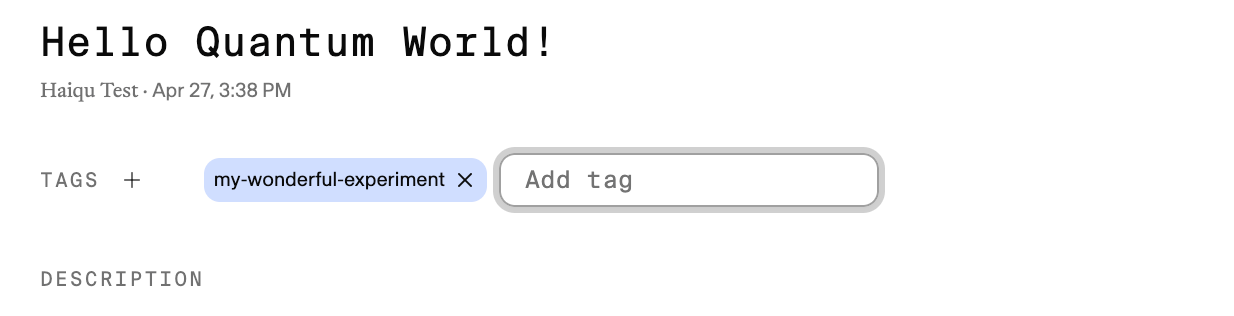

Enjoy additional improvements
- IBM fractional gates are now selectable per device:
haiqu.get_device("ibm_boston", use_fractional_gates=True)propagates continuous-anglerx/rzzsupport throughtranspile,run, andvariational_optimization. Inside hybrid programs, setoptions={"use_fractional_gates": True}on theDeviceLayer. - Job parameters are validated client-side. Data loading, compression, postprocessing, and backpropagation payloads now enforce their limits before submission, so an out-of-range qubit count, layer count, interval, or fine-tuning budget fails immediately with a clear message instead of consuming a job.
- General performance improvements and expanded reference documentation.
v1.4.0
Haiqu v1.4.0
Your notebooks, wherever they live!- This release makes the SDK far more reliable at logging which notebook your source code actually came from in Haiqu Lab.
- The SDK hardens circuit serialization along the way - detects and resolves class-name collisions so operations like qiskit-ionq’s MSGate are no longer silently serialized as the wrong standard gate.
- Rounding things out, this release adds equivariant QML reference documentation and a corrected compression docstring example.
v1.3.0
Haiqu v1.3.0
Thanks to our early access users for the continuous feedback!Build on top of existing results
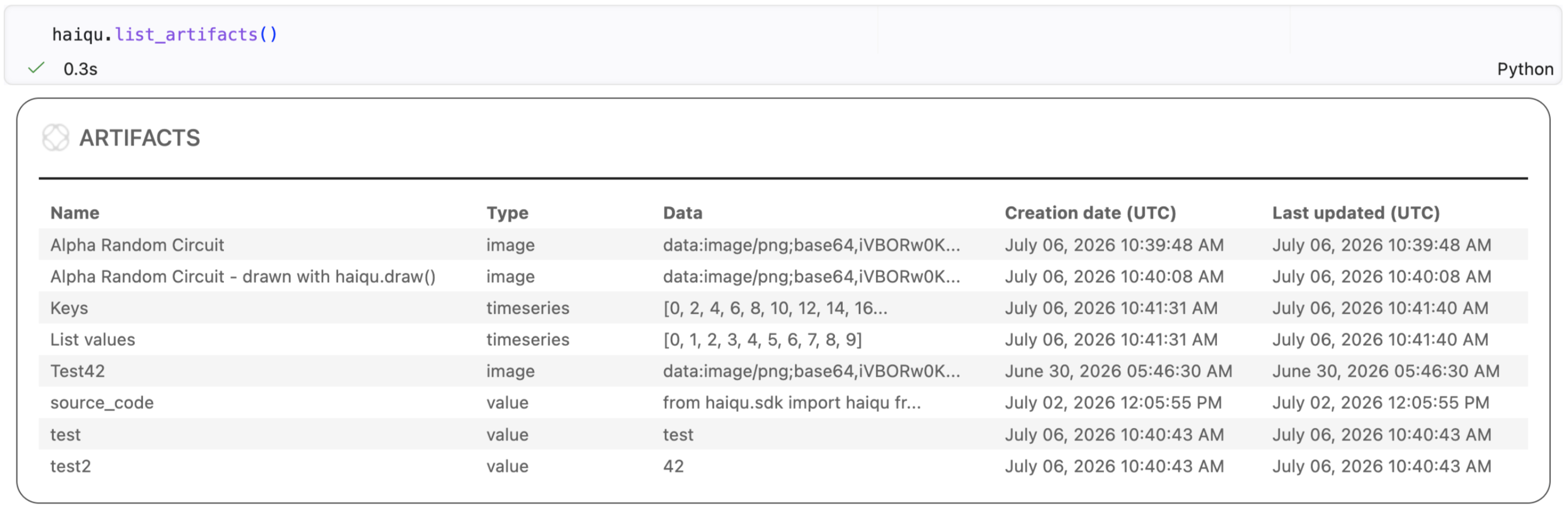
haiqu.list_artifacts() to view all stored artifacts—including images, plots, time series, source code, and scalar values—in a searchable table with creation and update timestamps. This provides a centralized record of experiment outputs, making it simple to inspect results, reproduce analyses, and retrieve generated assets without manually tracking files.For more information, see: https://docs.haiqu.ai/core_features/experiment-sharing.Perform nonlinear quantum parameter optimization
Haiqu SDK now supports nonlinear variational optimization, enabling objective functions defined as arbitrary symbolic expressions over multiple quantum observables rather than a single expectation value. This makes it possible to optimize custom loss functions—including fidelity-based objectives, ratios, constrained optimization, and algorithms such as the Quantum Variational Linear Solver (QVLS)—using Haiqu’s built-in optimizers. Support for computational-basis projector (0/1) operators further expands the range of measurement-based objective functions that can be expressed naturally.Enjoy additional improvements
- Load analytical functions into quantum states with
haiqu.function_loading(see https://docs.haiqu.ai/reference/data/function). - Use characteristic function loading to prepare quantum states from a broad class of stochastic models used in finance, physics, and heavy-tailed statistics (see https://docs.haiqu.ai/catalog/characteristic_functions)
- General performance improvements
v1.2.0
Haiqu v1.2.0
Thanks to early access users, we are including two important features in this release that enhance collaboration and boost orchestration flexibility.Share your results easily
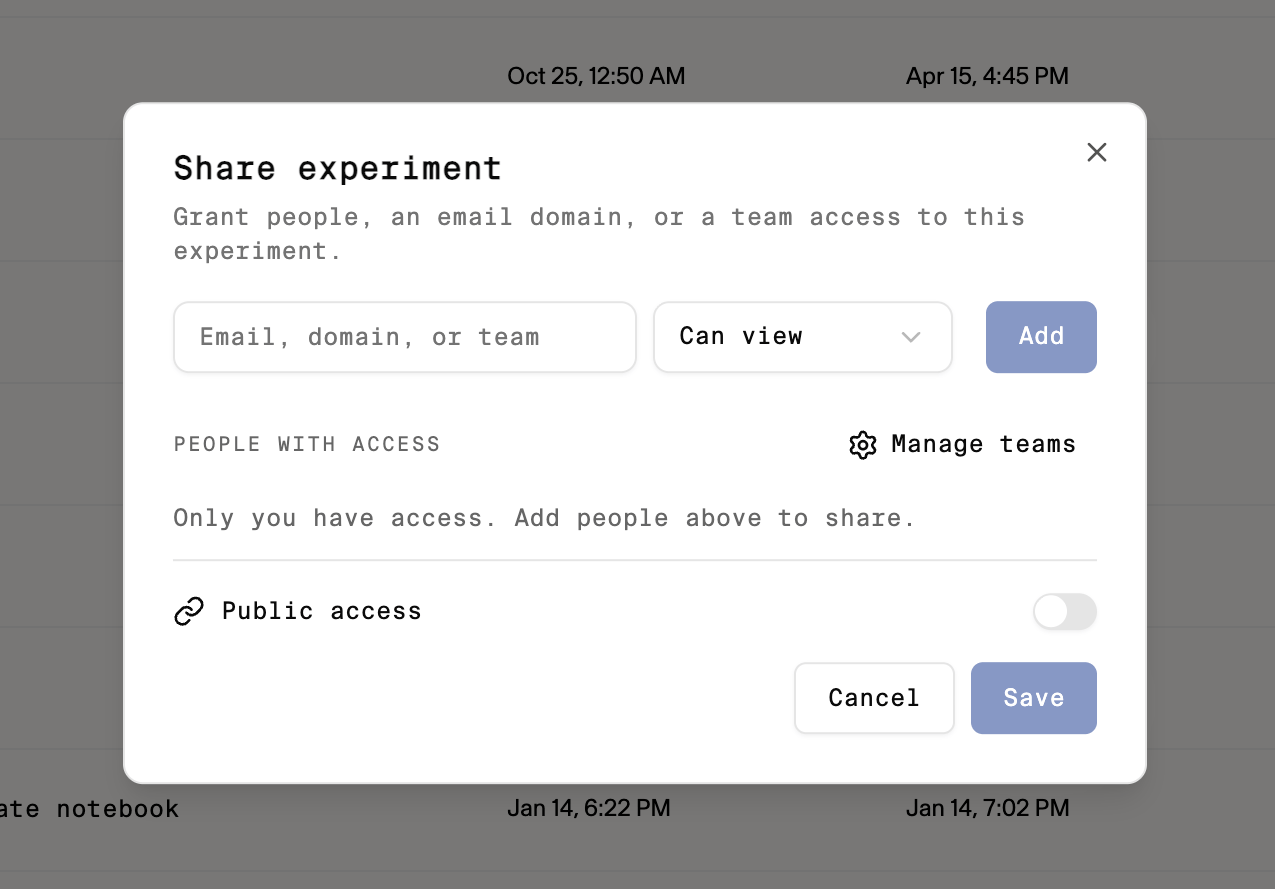
Build quantum workloads flexibly
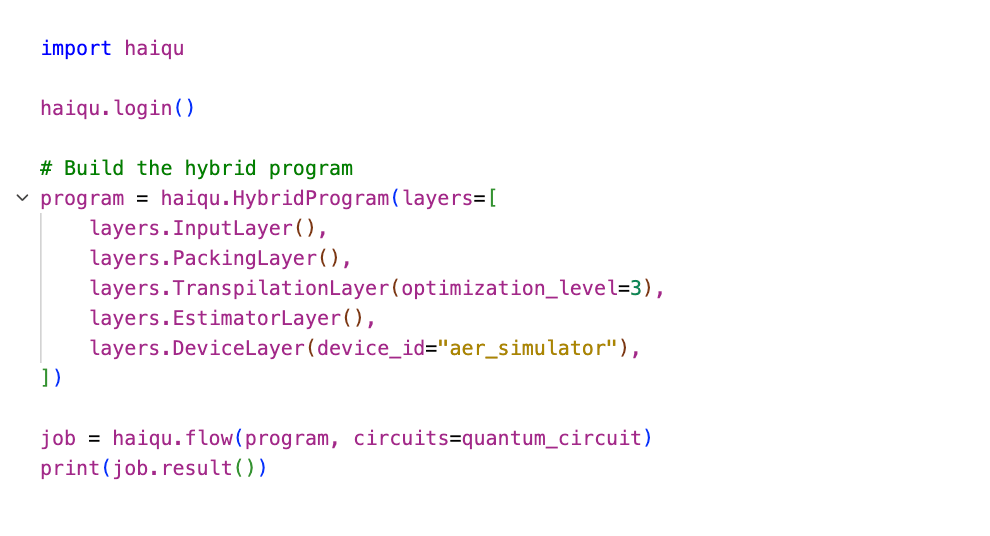
Enjoy additional improvements
- Stability improvements across the board for error management techniques.
- Dashboard UI improvements, featuring cost estimates for variational jobs.
- Improved integration with and cost estimation for IQM devices
v1.1.0
Haiqu v1.1.0
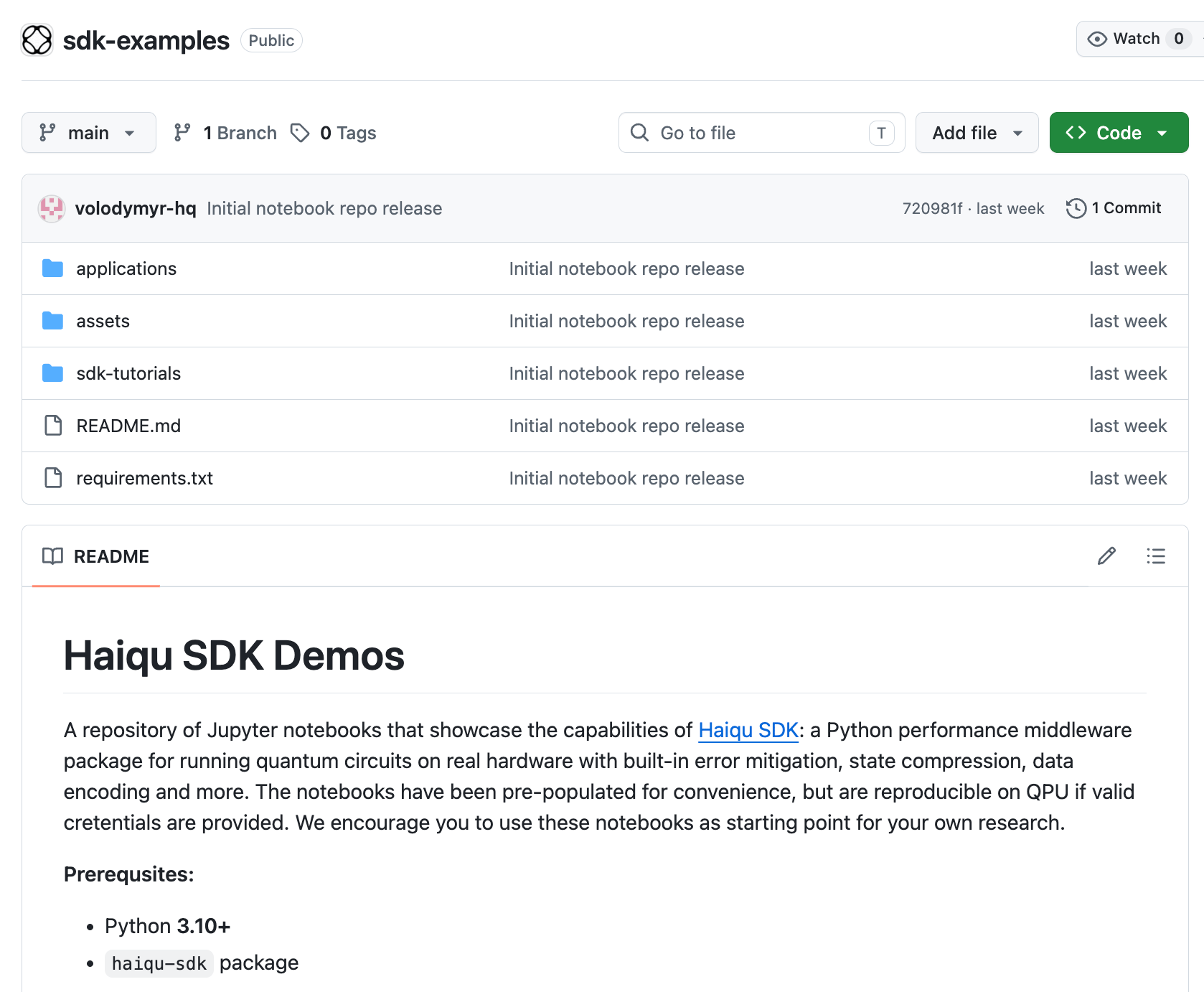
We’re grateful to our early access users for their feedback, which continue to shape many of the improvements included in this release.Learn from and ground AI agents with tutorials
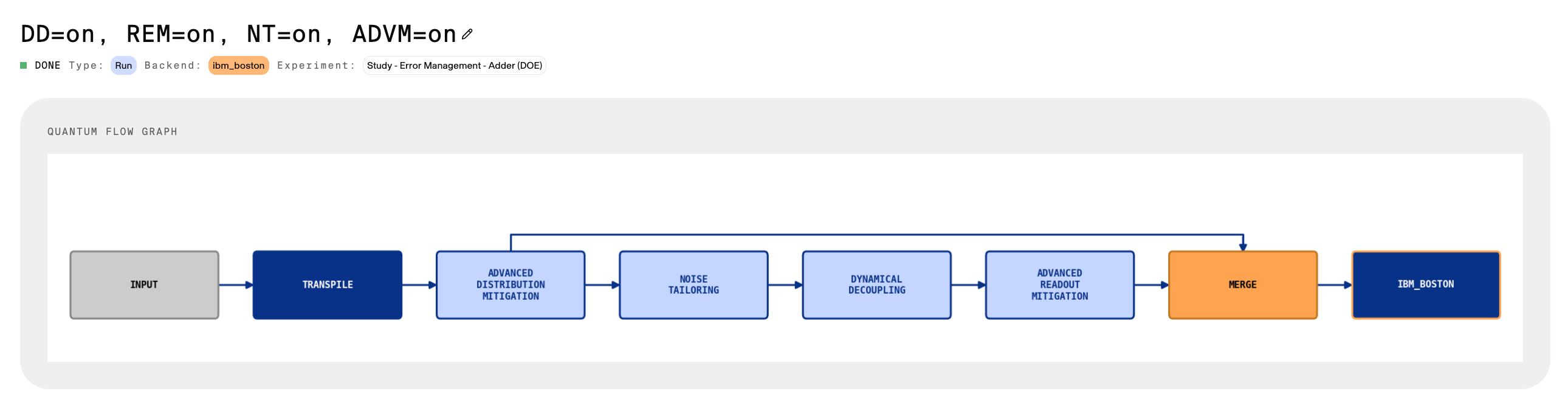
See how jobs are optimized and orchestrated
Compress parameterized quantum circuits
We now allow users to compress parameterized quantum circuits used in variational jobs via the newly addeduse_compression flag for haiqu.variational_optimization.Toggling this on dramatically improves performance on hardware runs by reducing two-qubit gate depths in variational circuits by over 100x for certain applications.We now allow users to compress parameterized quantum circuits used in variational jobs via the newly added use_compression flag for haiqu.variational_optimization.Toggling this on dramatically improves performance on hardware runs by reducing two-qubit gate depths in variational circuits by over 100x for certain applications.For more information, see: https://docs.haiqu.ai/core_features/qml#variational-algorithmsEnjoy additional improvements
- A more memory-efficient version of error mitigation routines.
- The matrix product states (MPS) loading function
mps_loadinghas been upgraded to handle > 15 layers.
v1.0.5
Haiqu v1.0.5
Special thanks to our early access users for their feedback and requests, which continue to shape many of the improvements included in this release.Use new optimizers for variational jobs
We previously supported the gradient-free Nakanishi-Fujii-Todo (NFT) optimizer. With this release, users running quantum machine learning (QML) and variational quantum eigensolver (VQE) workloads gain access to an expanded set of optimizers, including methods such as COBYLA, providing greater flexibility in choosing the optimizer best suited to their application.To learn more, visit: https://docs.haiqu.ai/core_features/qml#optimizer-details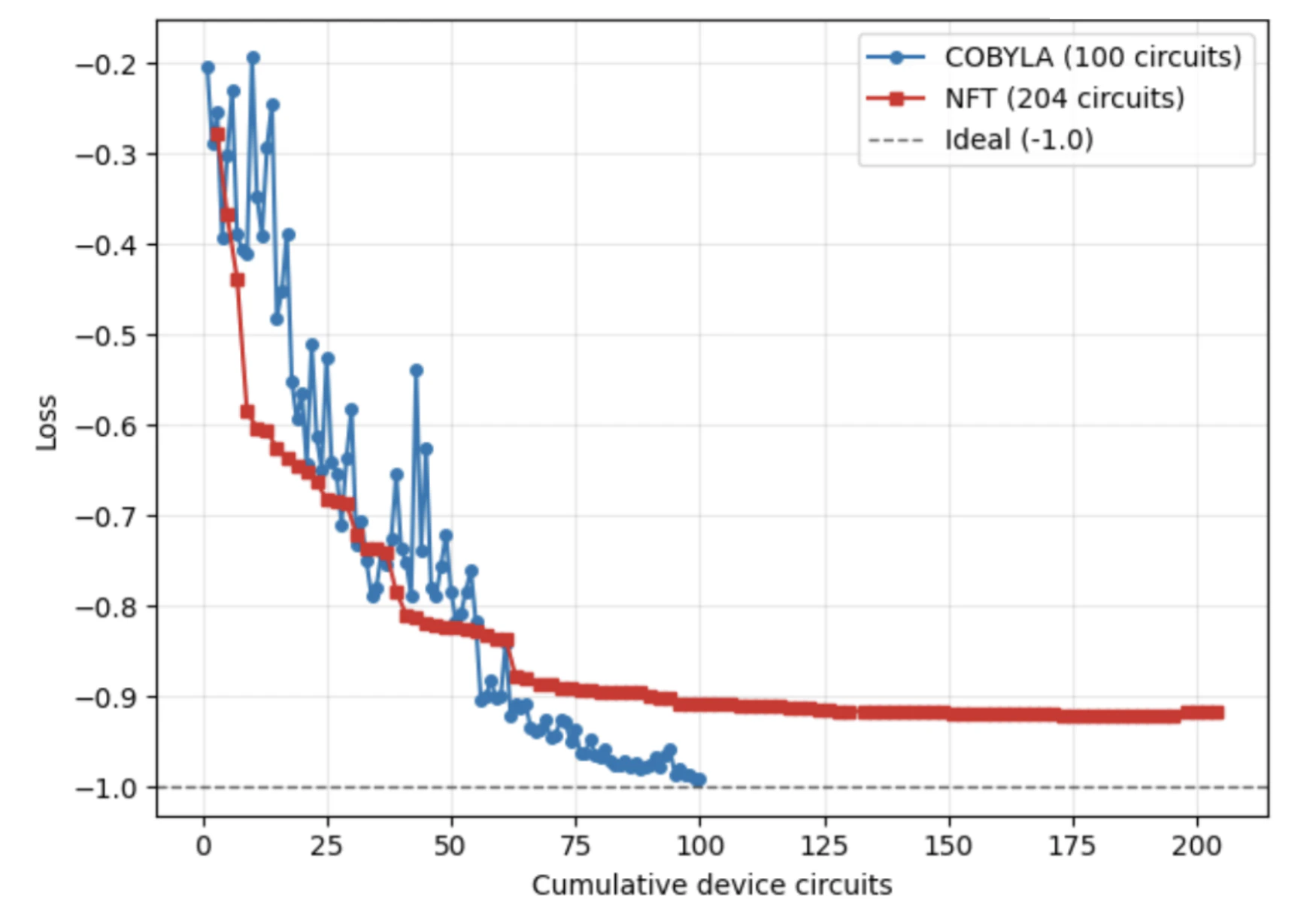
Install and update the Haiqu SDK with ease
The Haiqu SDK is now installable through a standard public Python package flow, eliminating the need for GitHub-authenticated access. This release significantly reduces onboarding friction and marks a major step toward scalable, production-ready developer experience.Enjoy additional improvements
- A more memory-efficient version of state compression has been released, enabling compression of even deeper quantum circuits.
- Recommended job actions are now available directly from the dashboard, allowing users to quickly perform common operations—such as restarting or canceling jobs—from the same interface used to monitor and review workloads.
v1.0.4
Haiqu v1.0.4
We would like to thank our early access users for their continued feedback and feature requests, which have helped shape many of the improvements introduced in this release.Load matrix product states
Haiqu now supports direct loading of matrix product states (MPS) onto quantum processors through the new mps_loading function.
Transpile circuits efficiently
A new multi-pass transpilation workflow automatically selects the most effective optimization strategy for a given circuit. These improvements deliver greater robustness and performance, reducing two-qubit gate depth by an additional ~37%.A new multi-pass transpilation workflow automatically selects the most effective optimization strategy for a given circuit. These improvements deliver greater robustness and performance, reducing two-qubit gate depth by an additional ~37%.To learn more, visit: https://docs.haiqu.ai/reference/run/transpileVisualize compressed circuit structure
The Haiqu dashboard now features dedicated circuit pages that provide users with a clearer view of circuit structures and key execution metrics, including: active qubit count, two-qubit gate depth, and estimated quantum cloud cost. Users can also inspect noise contributions across qubits and circuit layers alongside detailed circuit diagrams for deeper analysis and debugging.he Haiqu dashboard now features dedicated circuit pages that provide users with a clearer view of circuit structures and key execution metrics, including: active qubit count, two-qubit gate depth, and estimated quantum cloud cost. Users can also inspect noise contributions across qubits and circuit layers alongside detailed circuit diagrams for deeper analysis and debugging.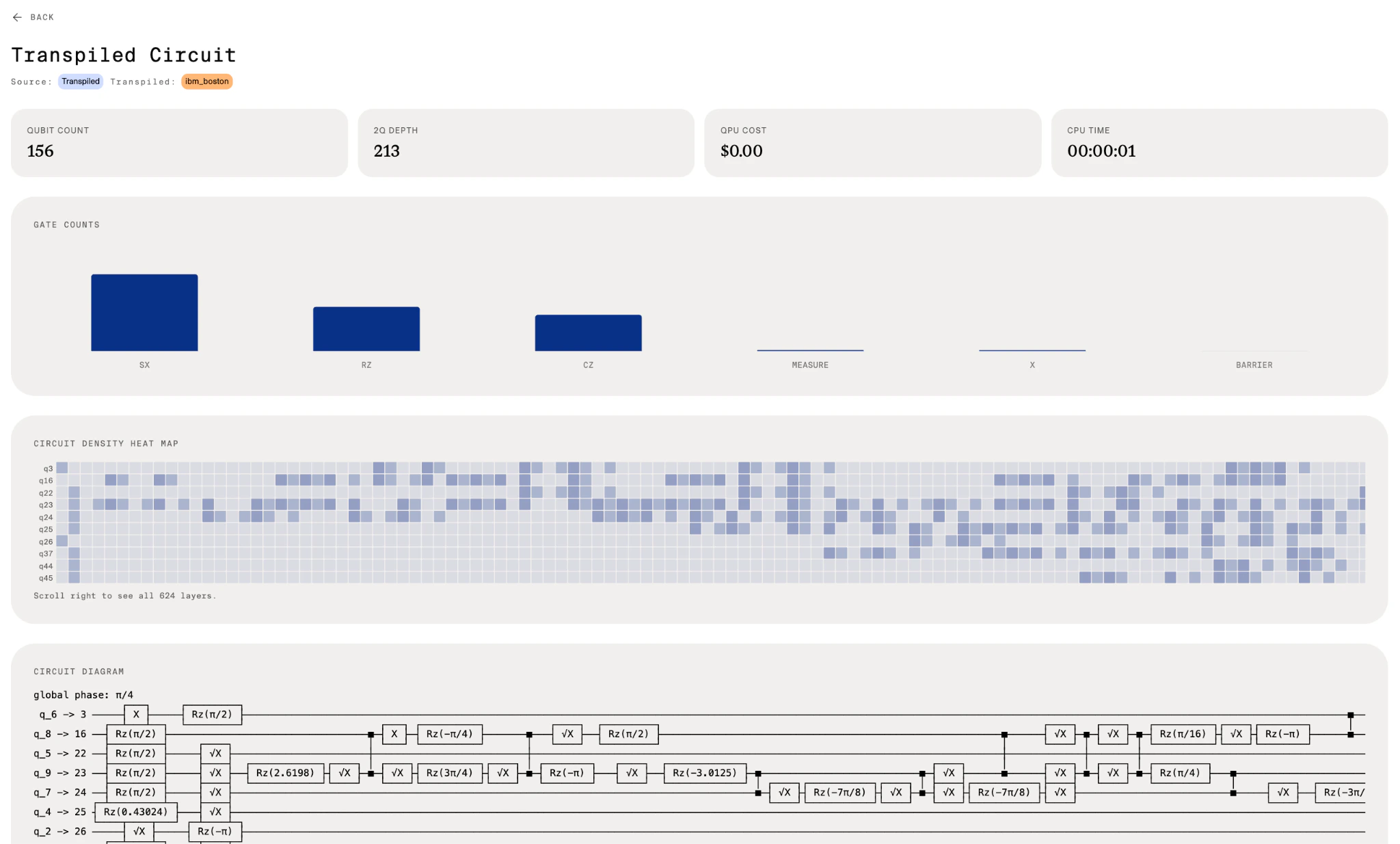
Enjoy additional improvements
Improved resource utilization for dynamical decoupling, enabling 100x faster transpilation passes in some cases. Improved observable-based readout error mitigation.v1.0.3
Haiqu v1.0.3
Apply robust error mitigation
In this release we enhanced reliability of the error mitigation routines for more consistent execution and improved stability when combined with other techniques (e.g., block vector loading).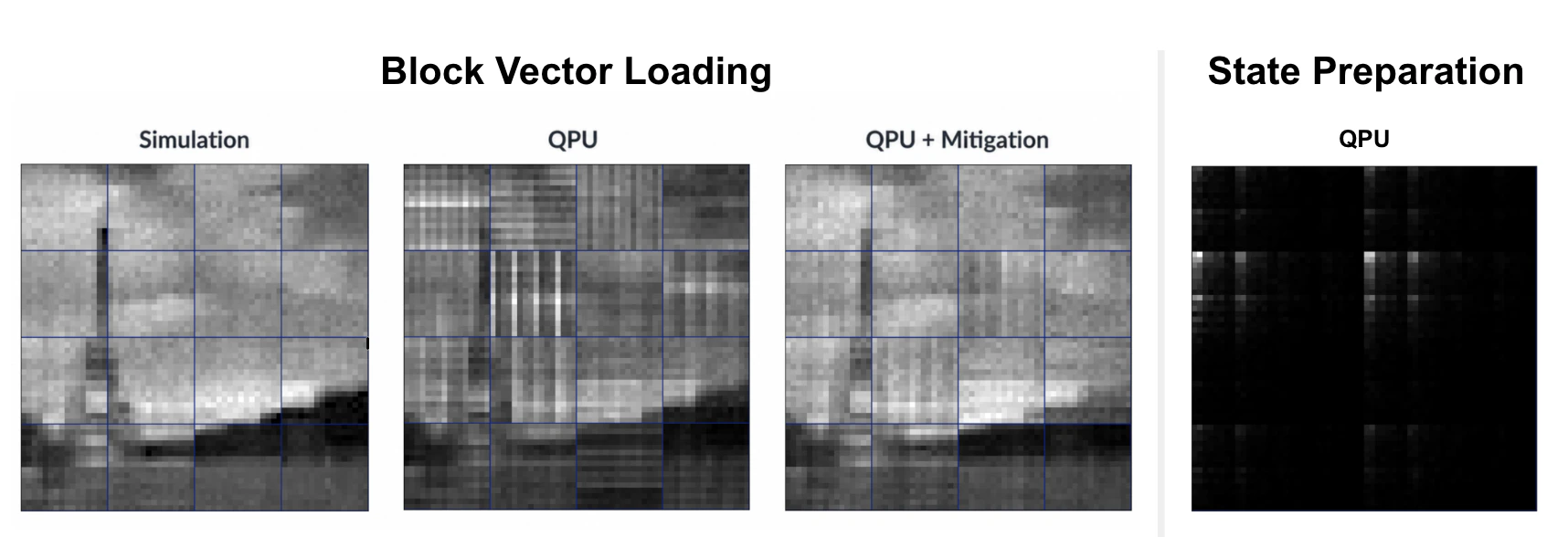
Gain quick insights with execution frontier plots
Updated quantum volume visualization to include execution frontier, providing deeper insight into circuits and their expected performance.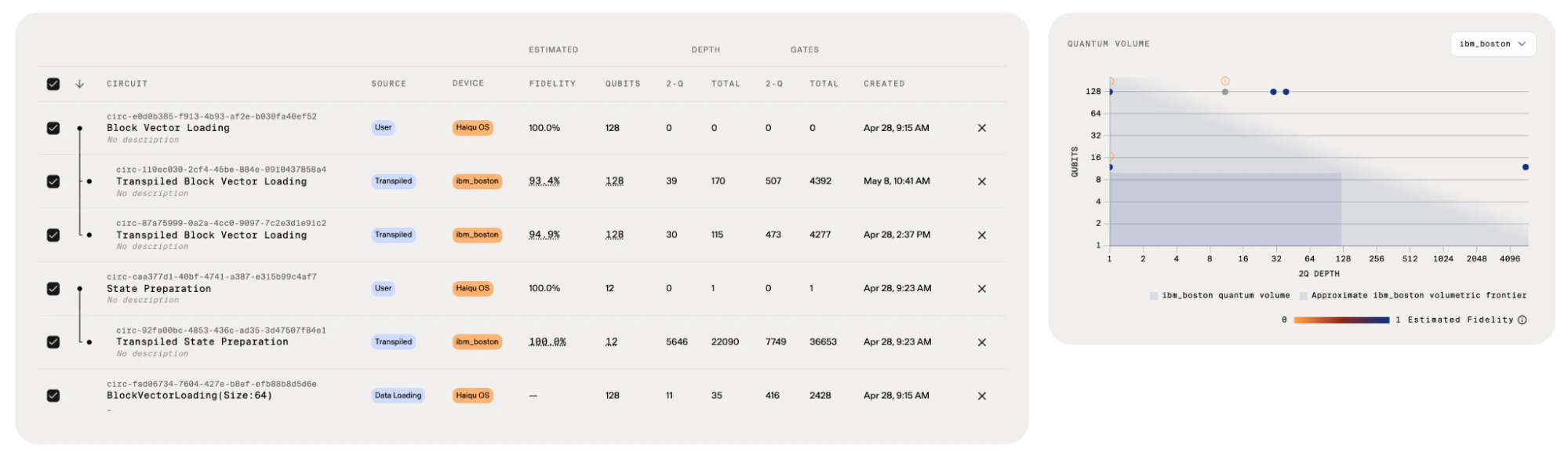
Enjoy additional improvements
Added support to log dataframe tables and render them on the dashboard, enriching experiment context and analysis.Delivered dashboard performance optimizations, resulting in faster query execution and rendering speeds across the UI.Simplified function interfaces by making IBM Credentials optional when operating with fake devices or indry_run mode.v1.0.0
Haiqu v1.0.0
A Platform for Enterprise Quantum Workloads
Today we’re launching Haiqu v1.0, a platform built to help businesses develop and run practical quantum workloads on today’s quantum hardware.Haiqu provides a unified software layer for building, optimizing, analyzing, and executing quantum applications across leading quantum providers, including IBM Quantum, Amazon Braket, and IonQ. The platform is designed to reduce the complexity of working with noisy quantum systems while helping teams evaluate real-world quantum use cases more efficiently.Make Every Quantum Dollar Go Further
Quantum computing remains expensive, especially at scale. Haiqu reduces quantum cloud costs in three ways: by rewriting circuits into shallower and more efficient forms, by improving hardware utilization through orchestration, and by increasing solution fidelity so fewer shots are required overall. Some teams have already reported 1,000× lower execution costs using Haiqu.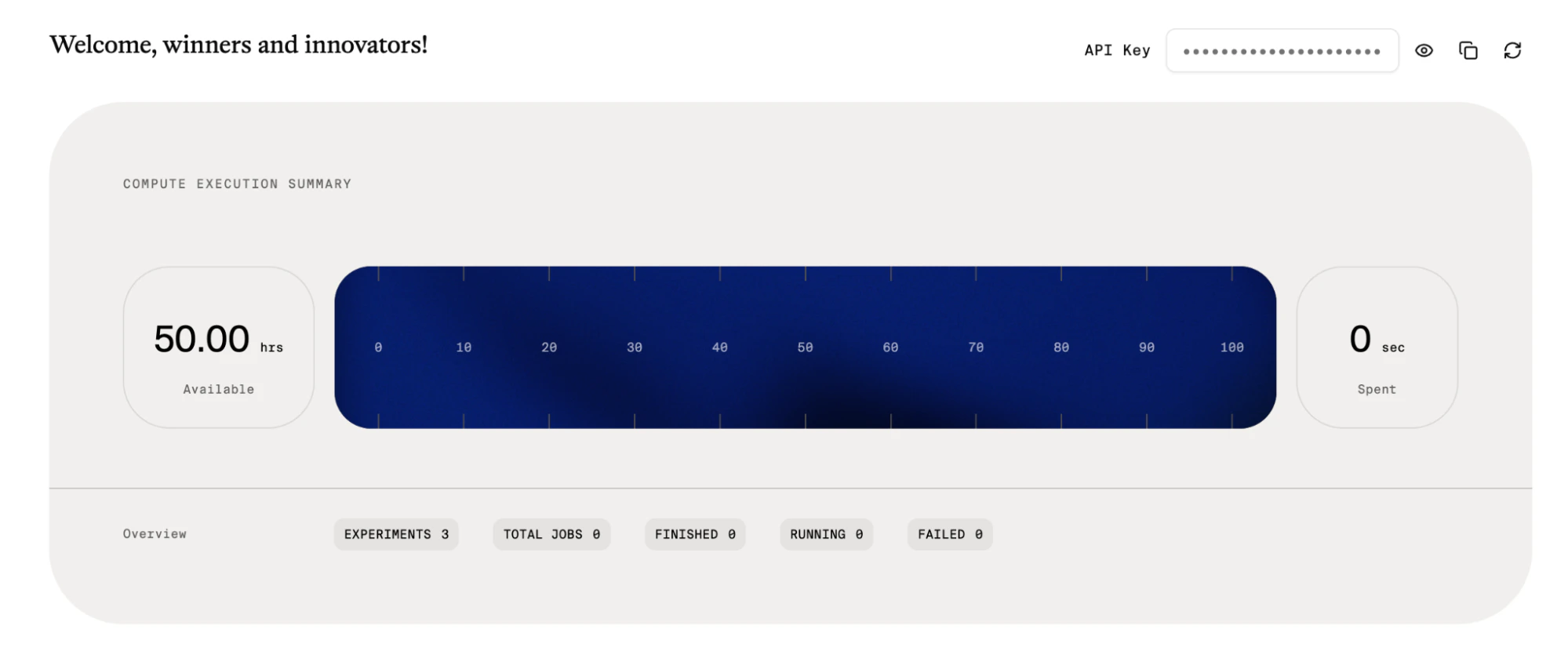
Hardware-Aware Optimization for Real Quantum Systems
A major focus of Haiqu v1.0 is performance optimization. The platform seamlessly applies hardware-aware circuit compression, transpilation, and error mitigation techniques to improve execution fidelity on current-generation quantum processors. These capabilities help reduce circuit depth, lower gate counts, and improve solution quality without requiring teams to manually tune circuits for each backend.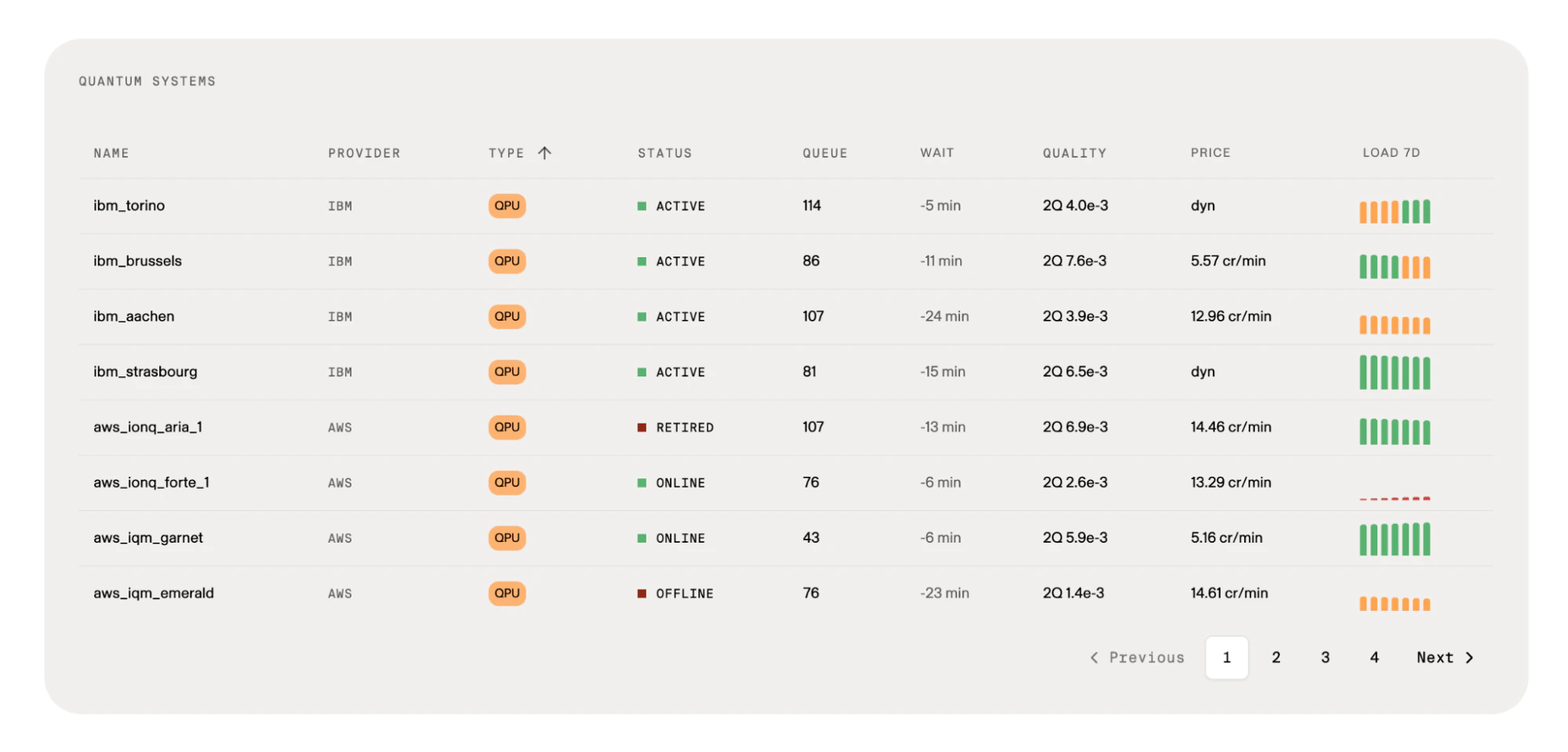
Scalable Quantum Data Loading
Haiqu v1.0 also introduces four new scalable quantum data loading and feature embedding capabilities for data-intensive applications such as quantum machine learning and optimization. By dramatically reducing the two-qubit gate depth required for data loading (by more than 350× in some cases), Haiqu enables teams to fit larger and more practical workloads onto real hardware, leaving more room for the algorithm itself to run.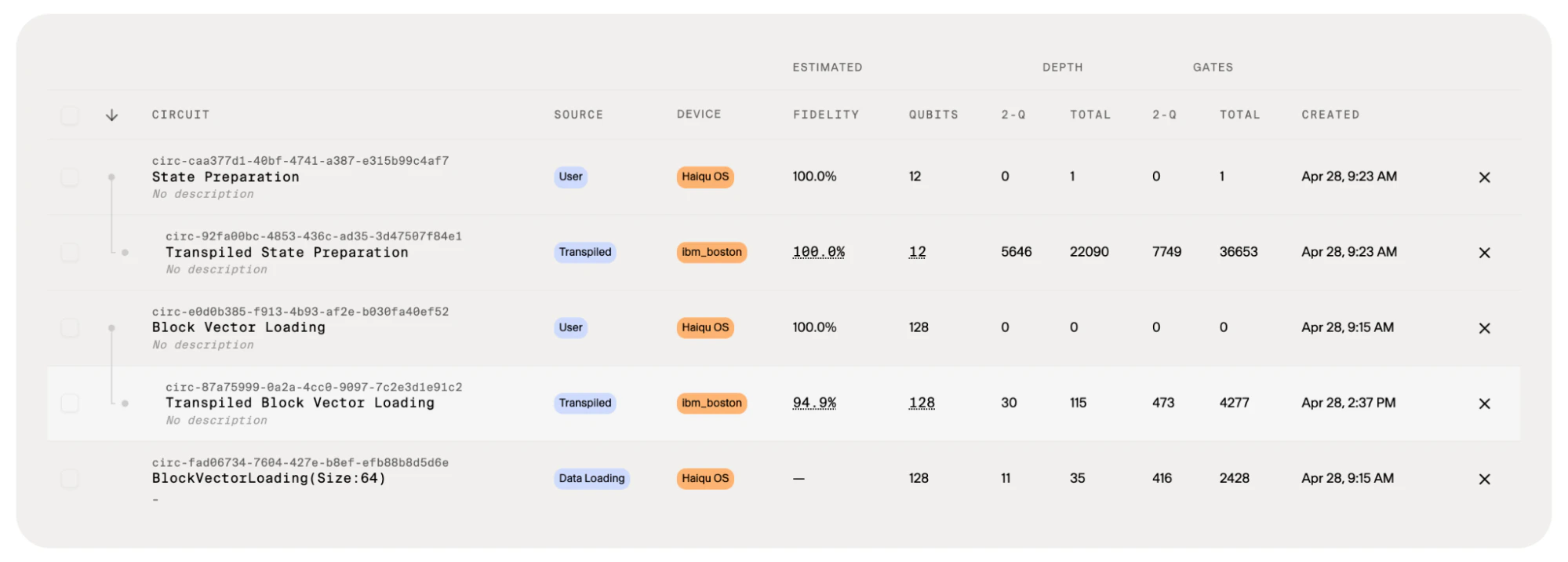
Integrated Analytics and Experiment Management
To support enterprise experimentation and benchmarking, Haiqu includes integrated analytics and experiment management tools that allow teams to track executions, compare circuit performance, analyze hardware feasibility, and monitor optimization results across providers and devices.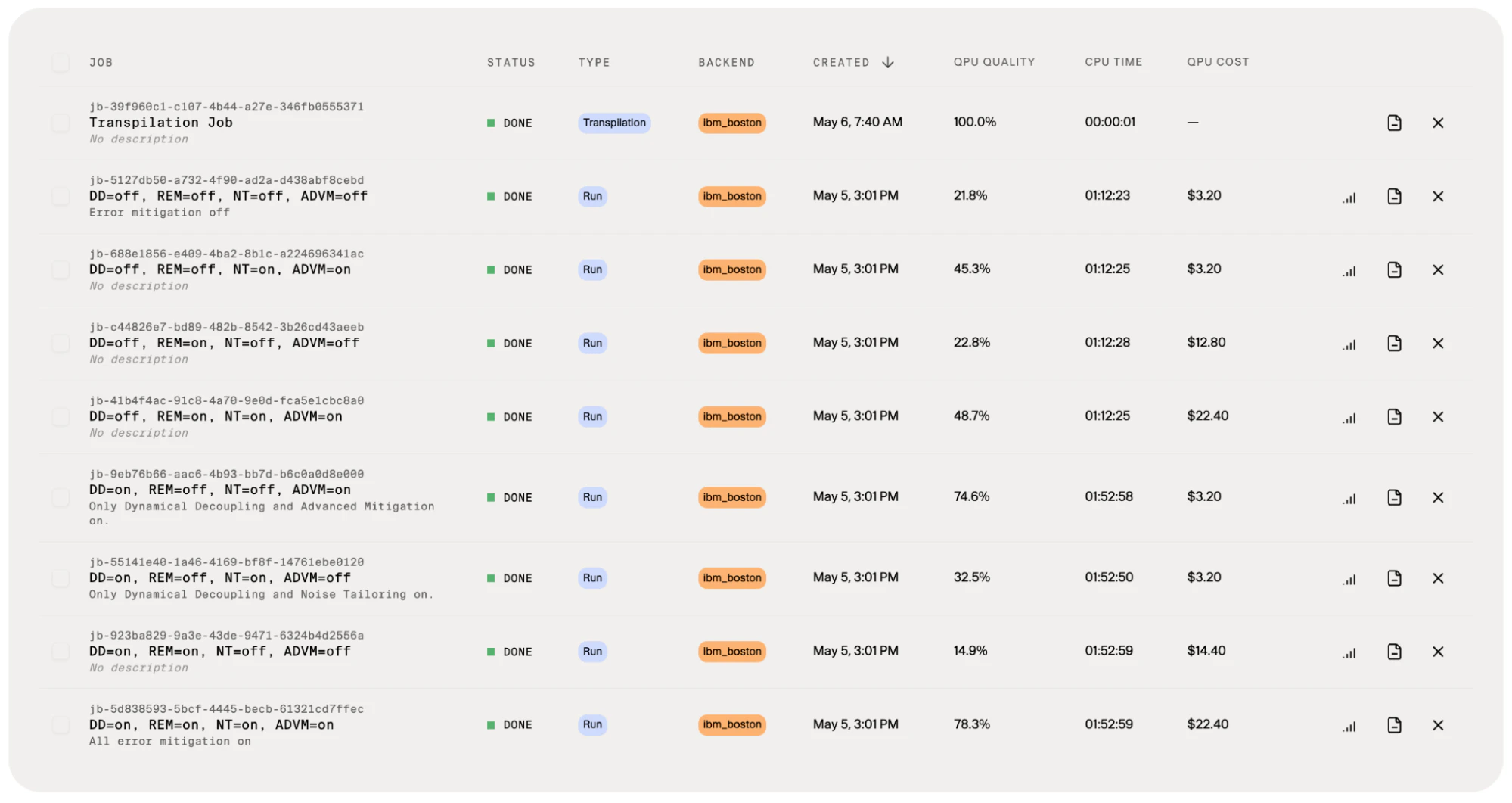
Developer-First Workflow
Haiqu is built around a developer-first workflow with native Qiskit interoperability, Python APIs, and cloud-hosted JupyterLab environments that make it easy to start building and running workloads quickly.The platform also integrates with modern AI-assisted development workflows through a model context provider that understands commands such as “Compress this circuit” or “Apply error mitigation,” helping teams move faster from ideation to working prototypes.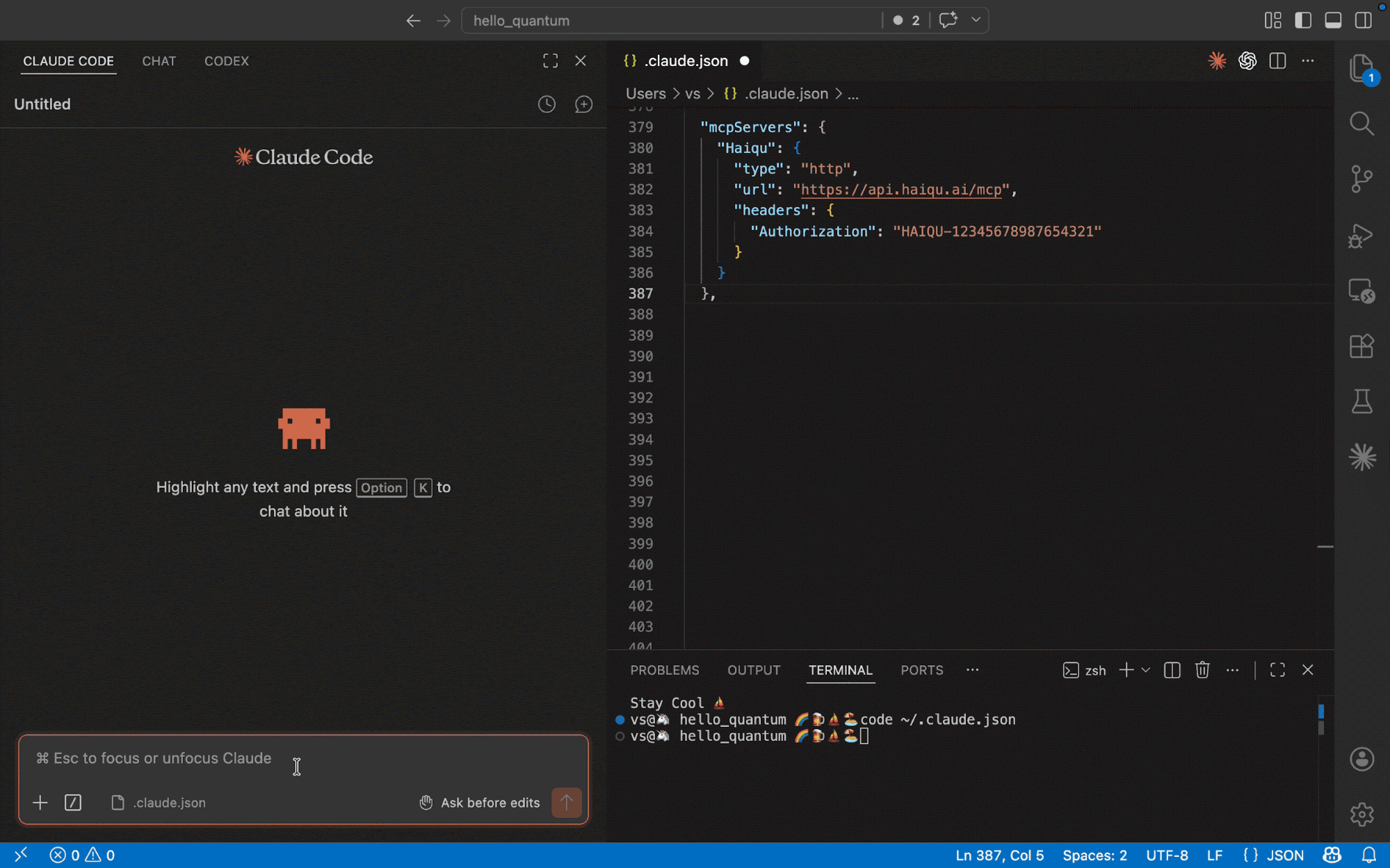
Enabling the Next Phase of Quantum Adoption
Quantum computing is entering a new phase where organizations are moving beyond theoretical exploration toward practical evaluation of business applications. Haiqu v1.0 is designed to help enterprises navigate that transition by providing the infrastructure needed to optimize workloads, benchmark hardware, and accelerate experimentation on real quantum systems.Added
Added
Deployment
- Flexible Deployment Options: Added support for enterprise deployment within private VPC environments, enabling secure and customizable infrastructure setups.
Performance Benchmarking
- Unified Results Interface: Introduced a standardized interface for all quantum run results with built-in performance estimates.
- Middleware Optimization Controls: Users can now enable or disable middleware optimizations to evaluate their impact on performance.
- Pareto Analysis GUI: Added a graphical interface for visualizing trade-offs between accuracy, cost, runtime, and hardware parameters.
- Automated Run Tracking: All runs are now automatically documented, providing a clear and auditable decision trail.
SDK & Metrics
- Enhanced Proxy Performance Metrics
- Added error bars to expectation values
- Improved consistency of gate-level metrics
- Expanded circuit metadata (author, job linkage, transpilation differences)
- Improved Circuit Insights enabling diagnosis of:
- QPU result reliability
- Root causes of poor performance
- Suitability of problems for hardware execution
QML & Simulation
- Iterative QML Workflows: Added support for iterative training, pretraining, and deployment of QML mitigation pipelines via SDK.
- Statevector Simulator: Introduced a high-performance simulator for debugging, development, and pretraining.
- Device-Aware Circuit Compression: Added compression optimized for IBM heavy-hex and square architectures.
- Advanced Data Loading: Introduced isometry-based data loading with significantly improved fidelity and UX.
Dashboard
- Migrated the dashboard to React with a redesigned UI.
- Device Management Improvements: Added enhanced device visibility and detailed device information widgets.
- Experiment Reporting Enhancements
- New performance widgets
- Circuit-to-device mapping
- Improved notebook integration
- MCP server with access to experiment data for summarization and interpretation
- Differentiator Widget: Highlights experiments using key Haiqu features such as mitigation, compression, and large-scale data loading.
Identity & Access Management
Automatically sync API keys between Dashboard and Lab environments after updates (reduces setup friction, prevents configuration issues, and makes account management faster and more seamless).Billing & Credits
- Added automatic monthly credit refresh.
Changed / Updated
Changed / Updated
Billing & Credits
- Users are no longer charged for time spent waiting for the QPU vendor (while the QPU job is queued or running).
Performance & Execution
- Improved decision-making workflows with clearer performance insights and benchmarking tools.
- Enhanced transparency of circuit execution and optimization processes through richer metadata and metrics.
- Optimized execution efficiency:
- Reduced runtime and cost through better compilation and orchestration.
- Improved accuracy via QML workflows and circuit optimizations.
Bug Fixes
Bug Fixes
- Gate Metrics Inconsistencies: Fixed inconsistencies in reported gate-level performance metrics.
- Circuit Data Representation: Corrected issues in circuit tables to ensure accurate and consistent metadata display.
v0.3.0
This release introduces updates across SDK, Experiment Tracking, Dashboard, Credits & Pricing, and User Guides documentation (Jupyter Notebooks) with improvements to usability, reliability, and observability.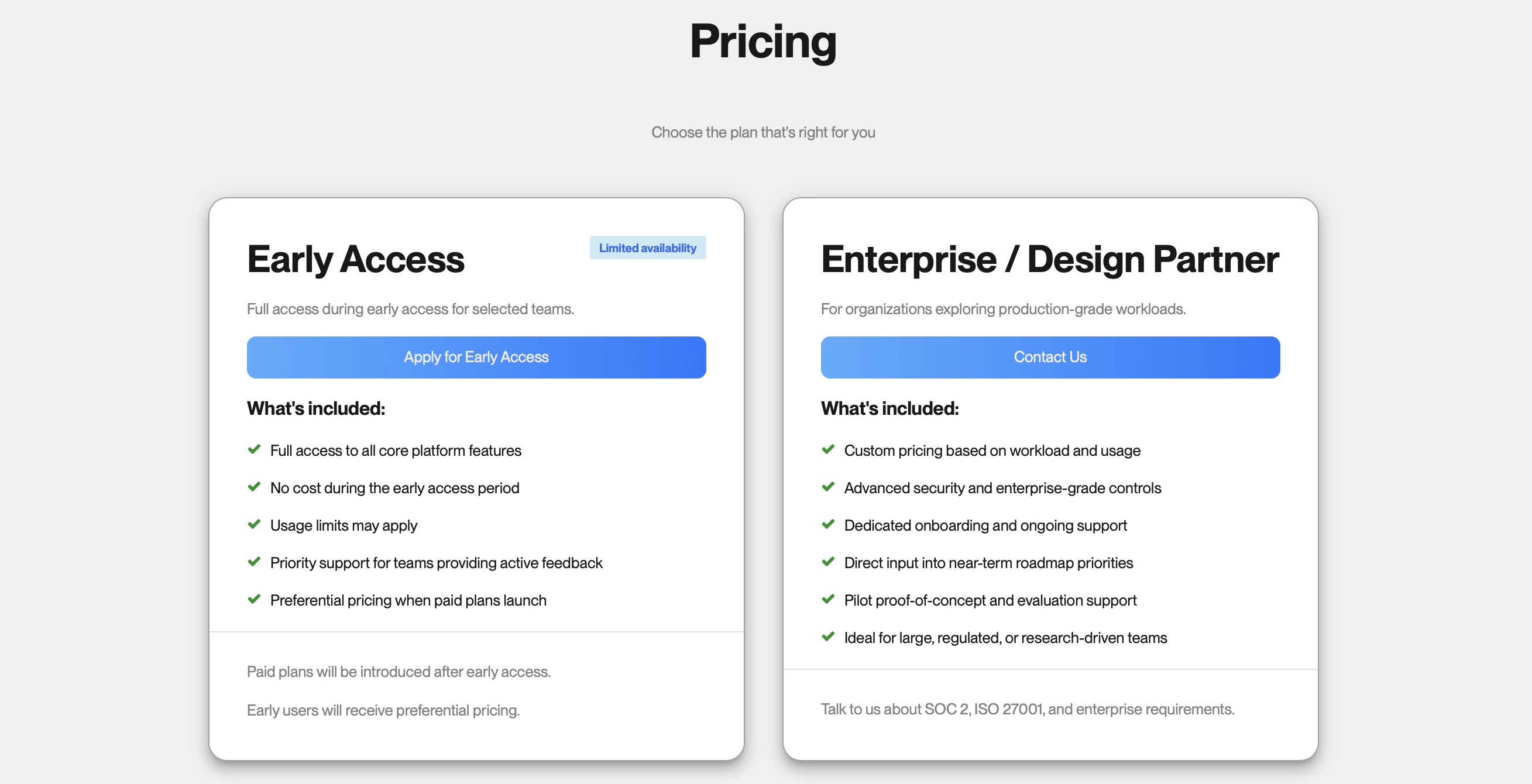

4. Method
1. Pricing and credits management
We set up two pricing models:2. Experiment Tracking: Reports
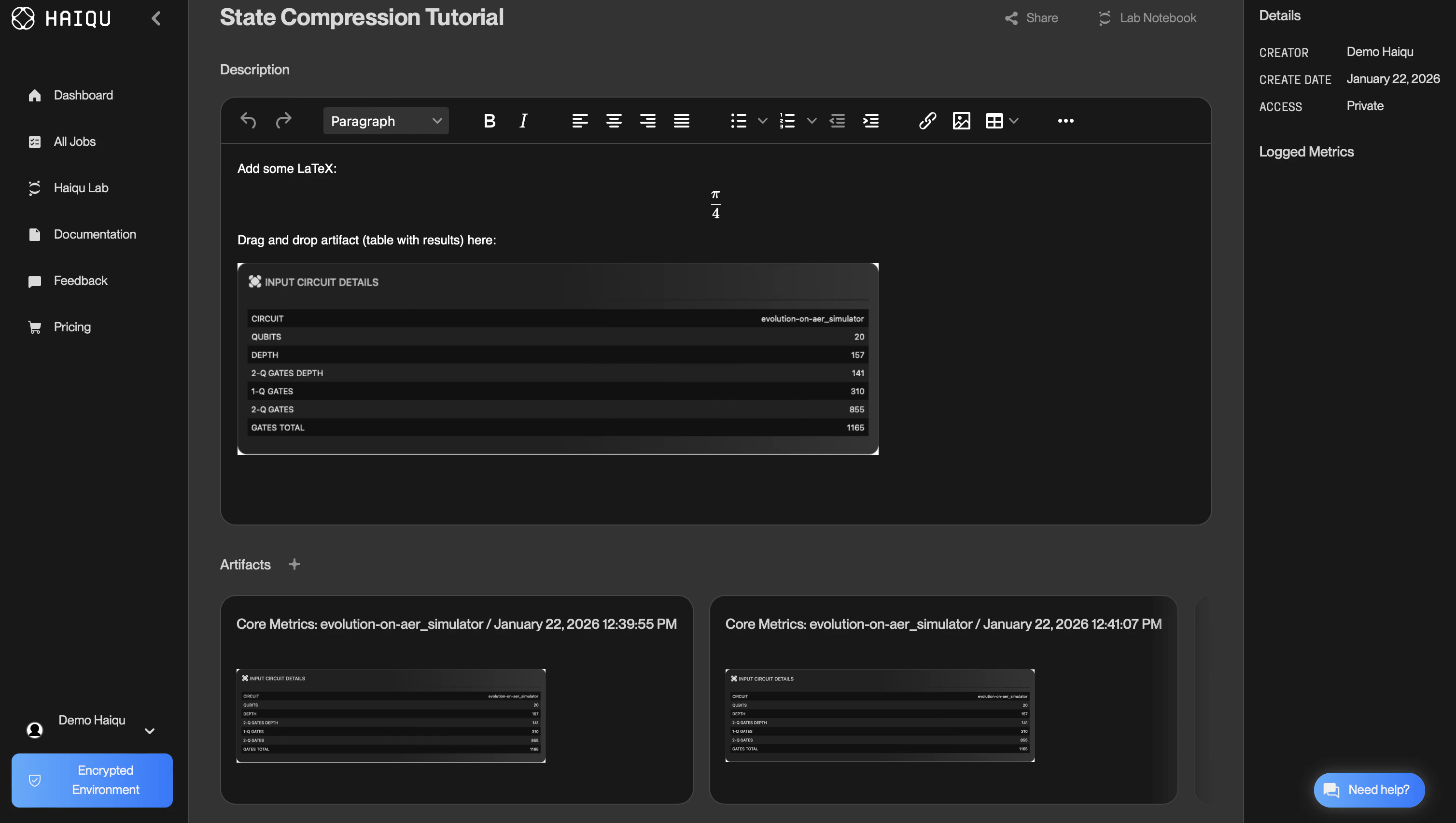
Experiment reports support LaTeX-style Markdown for scientific formatting and allow users to add artifacts via drag-and-drop, making it easy to compose structured, shareable experiment summaries.Users can log Matplotlib plots as experiment artifacts, which appear in the Dashboard as part of the experiment history. Execution result tables can also be logged as artifacts. Supported tables include: Circuit core metrics, Circuit advanced metrics, Circuit all metrics, and Circuit comparison tables.3. Security and Privacy
Haiqu is ISO/IEC 27001 compliant and uses IAM-based controls to ensure customer data is handled with strong, auditable security practices. Access is granted only on a need-to-know basis, and clear records of who accessed what and when, supporting both compliance requirements and operational transparency, are maintained.To further reduce insider risk, production access is exception-based and support access is temporary and approved, with all activity logged and monitored. When needed, we can also provide access logs to help customers investigate incidents and meet internal governance standards.4. Method haiqu.postprocess()
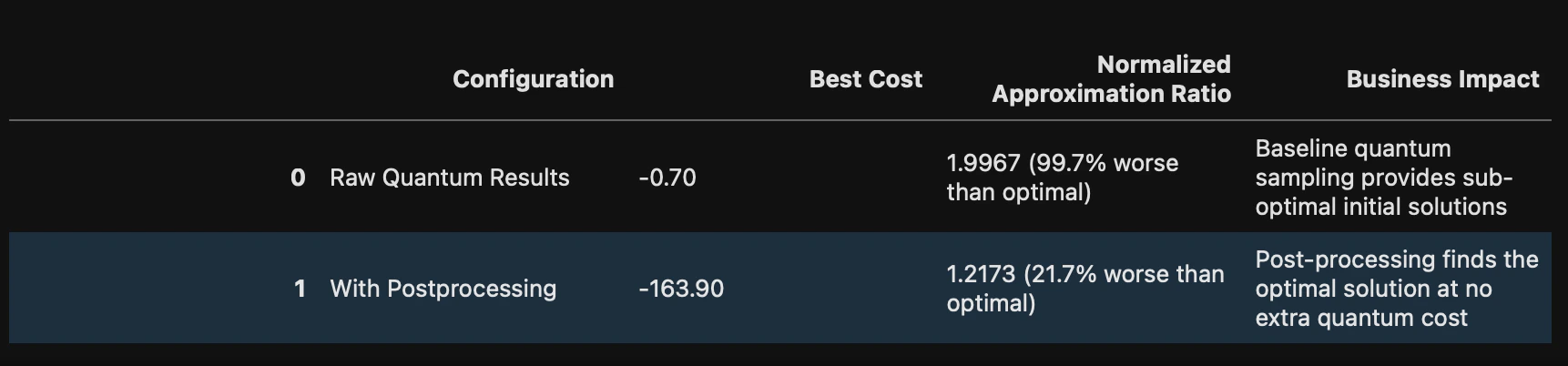
- What does it do? Applies classical heuristics (e.g., bit-flip search) to measured bitstrings to find a better solution to the QUBO problem.
- How do I use it? Pass counts or probability distribution obtained by running circuits on any backend, and pass the corresponding QUBO problem object, then call
postprocess().
Added
Added
Dashboard—Experiment Tracking
- Plot logging Users can now log Matplotlib (MPL) plots as experiment artifacts using the
haiqu.log()method. Logged plots appear in the Dashboard as part of the experiment history. - Logging of tables as artifacts Users can now include notebook-generated tables and visual outputs as artifacts in experiment reports. Added logging support for:
- Circuit core metrics
- Circuit advanced metrics
- Circuit all metrics
- Circuit comparison tables
- Reports in experiment tracking
- LaTeX-style Markdown support (UX)
- Ability to insert artifacts into reports by drag and drop
- Job deletion support
Dashboard—Pricing Model
- Pricing and access management
- Defined two pricing packages
- Added a Credits Request form and Pricing panel in the Dashboard
- Enabled contacting support via Slack
- Designed credits expiration flow in the SDK
- Added Admin Panel UI for manual credit allocation
- Credits management
- Account creation now includes allocated credits (1h of execution time)
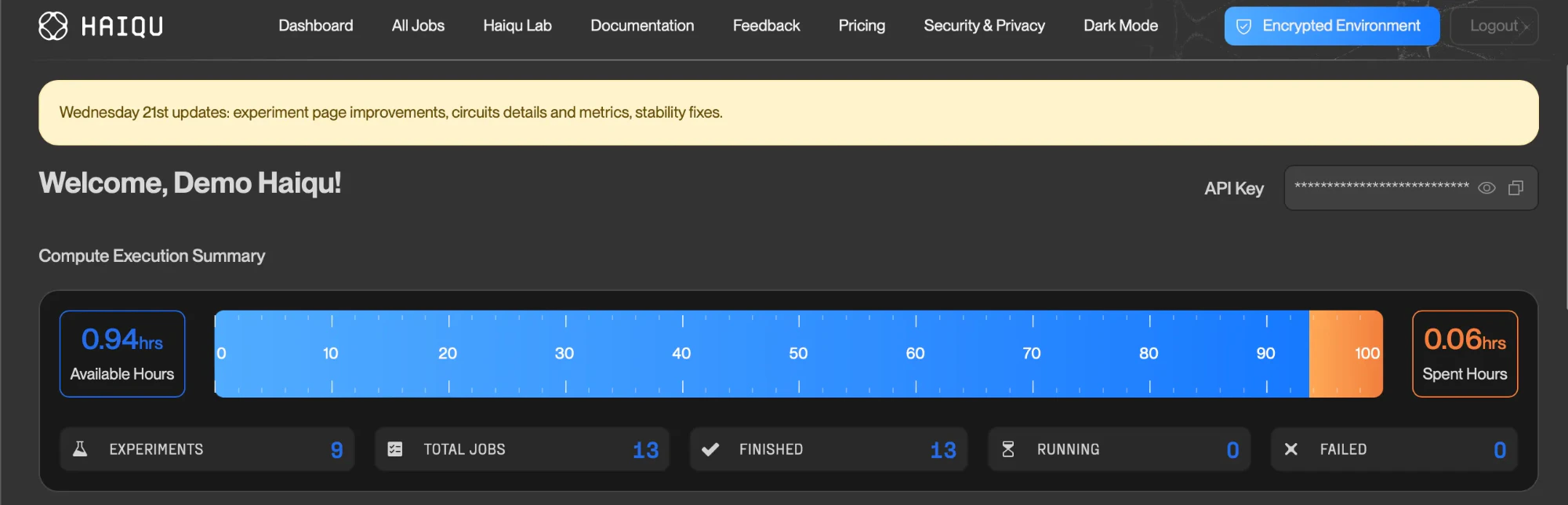
- Added a credits usage progress bar on the Dashboard
- Implemented credits consumption mechanics
- Added SDK error messaging when credits are exhausted
- Allows already-started jobs to finish even if credits expire during execution
Changed / Updated
Changed / Updated
SDK—Execution
Renamed therun method argument (backend_name → device_id) for clarity and consistency when selecting execution devices.SDK—Postprocessing
Updated thehaiqu.postprocess and haiqu.solve_qubo methods:- Improved QUBO problem definition and solution using a non-iterative method
- Enhanced results postprocessing pipeline
- Added detailed documentation explaining the updated workflow
Jupyter Notebooks
Released an updated set of Jupyter notebooks in our Jupyter Lab env to help users get started with the Haiqu SDK, reflecting the latest APIs, workflows, and examples.Bug Fixes
Bug Fixes
- IonQ transpilation fix: Fixed a transpilation error for IonQ devices by updating the equivalence library in the transpilation worker to support IonQ-specific gates.
- Aer simulator transpilation fix: Fixed a transpilation failure caused by a missing
operation_namesattribute when usingaer_simulator.