Complimentary to the tools that allow to execute quantum optimization algorithms on QPU (see LR-QAOA benchmark in the Data Sheet), Haiqu SDK offers utility functionality to perform classical postprossesing of the results acquired from QPU when solving an optimization problem. Here is how your workflow might look like:
1

Define your optimization problem

First, you need to define your optimization problem. Haiqu currently supports the quadratic unconstrained binary optimization (QUBO) problems that can be initialized with the corresponding class:
from haiqu.optimization import QUBO

# the problem can be initialized from a CPLEX/LP file
problem = QUBO.from_file("FILEPATH.lp")
If defining a problem from scratch you can also initialize from a graph object using QUBO.from_graph() or QUBO.from_hamiltonian() if you already have a Hamiltonian defined
2

Execute the workload on hardware

Whether you are using your own method or constructing an LR-QAOA circuit with Haiqu, you need to execute the circuit on device or simulator using haiqu.run:
from haiqu.solver import build_LR_QAOA_circuit

circuit = build_LR_QAOA_circuit(problem)

job = haiqu.run(circuit, shots=1000, backend_name="aer_simulator")

raw_counts = job.result()[0]
3

Postprocess the counts classically

After retrieving the sampled bitstrings from the QPU, you may want to postprocess the results using a classical algorithm (e.g. a local bitflip search):
from haiqu.optimization import postprocessing

# Compute raw costs using the QUBO object
raw_costs = {bitstring: optimization_problem.global_cost(bitstring[::-1], formulation="ising") 
             for bitstring in raw_counts.keys()}

# Apply post-processing with bitflip_search
processed_costs, processed_counts = postprocessing(
    counts=raw_counts,
    problem=optimization_problem,
    local_search_method=bitflip_search,  # Can be replaced with custom local search
    reverse_string=True,
    K=1,
    formulation="ising"
)

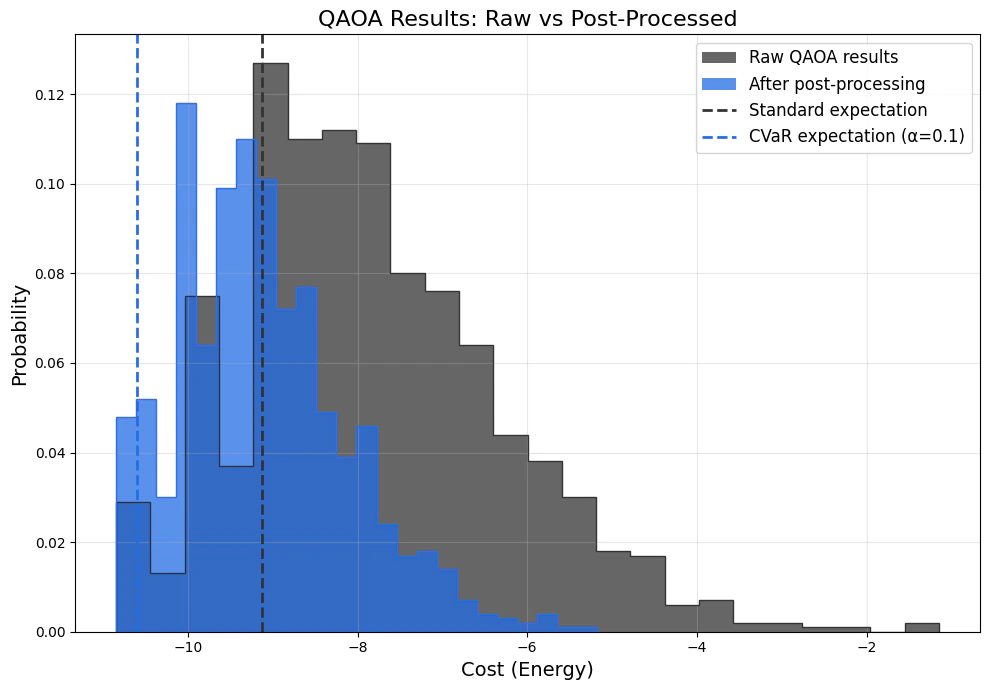
standard_expectation = CVaR_expectation(raw_counts, optimization_problem, alpha=1.0)
cvar_10_percent = CVaR_expectation(raw_counts, optimization_problem, alpha=0.1)
Here is how postprocessing might affect your QPU results: 21b0c7cf-cbed-433a-9459-8514b7e065ab.png