Complementary to the tools that allow you to execute quantum optimization algorithms on QPU (see LR-QAOA benchmark in the Data Sheet), Haiqu SDK offers utility functionality to perform classical postprocessing of the results acquired from a QPU when solving an optimization problem. Here is how your workflow might look:
1

Define your optimization problem

First, you need to define your optimization problem. Haiqu currently supports the quadratic unconstrained binary optimization (QUBO) problems that can be initialized with the corresponding class:
If defining a problem from scratch, you can also initialize from a graph object using QUBO.from_graph() or QUBO.from_hamiltonian() if you already have a Hamiltonian defined.
2

Execute the workload on hardware

Whether you are using your own method or constructing an LR-QAOA circuit with Haiqu, you need to execute the circuit on a device or simulator using haiqu.run:
3

Postprocess the counts classically

After retrieving the sampled bitstrings from the QPU, you may want to postprocess the results using a classical algorithm (e.g. a local bitflip search):
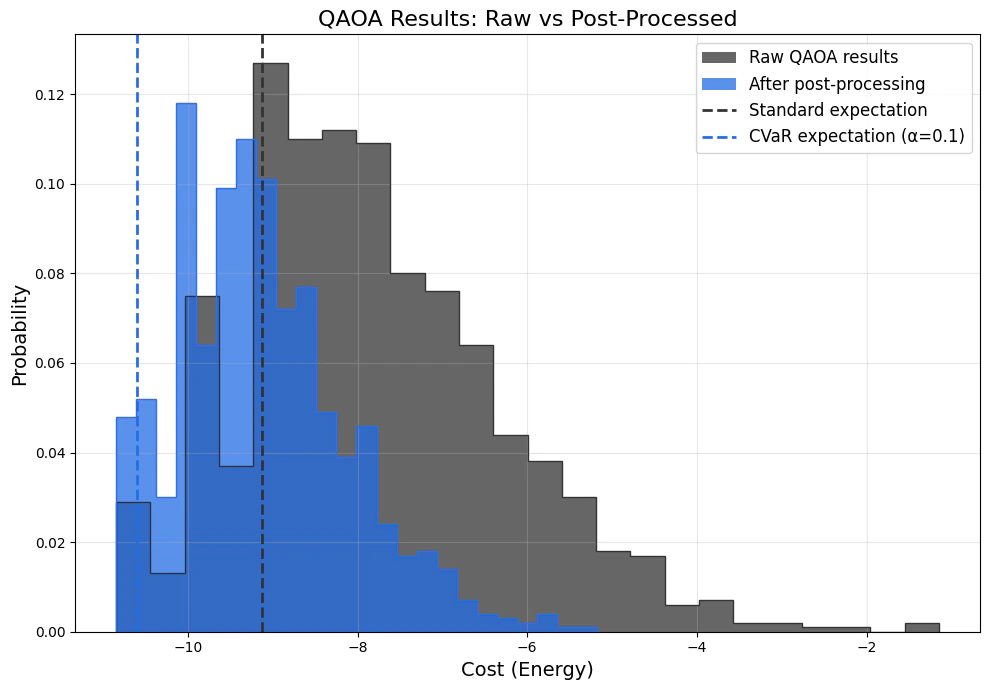
Here is how postprocessing might affect your QPU results: 21b0c7cf-cbed-433a-9459-8514b7e065ab.png