> ## Documentation Index
> Fetch the complete documentation index at: https://docs.haiqu.ai/llms.txt
> Use this file to discover all available pages before exploring further.
# Optimization & Postprocessing
> Classical enhancement of your quantum optimization for the best performance.
Complementary to the tools that allow you to execute quantum optimization algorithms on QPU (see LR-QAOA benchmark in the [Data Sheet](../catalog/datasheet)), Haiqu SDK offers utility functionality to perform classical postprocessing of the results acquired from a QPU when solving an optimization problem.
Here is how your workflow might look:
First, you need to define your optimization problem. Haiqu currently supports the quadratic unconstrained binary optimization (QUBO) problems that can be initialized with the corresponding class:
```python theme={null}
from haiqu.sdk.optimization import QUBO
# the problem can be initialized from a CPLEX/LP file
problem = QUBO.from_file("FILEPATH.lp")
```
If defining a problem from scratch, you can also initialize from a graph object using `QUBO.from_graph()` or `QUBO.from_hamiltonian()` if you already have a Hamiltonian defined.
Whether you are using your own method or constructing an LR-QAOA circuit with Haiqu, you need to execute the circuit on a device or simulator using `haiqu.run`:
```python theme={null}
circuit = haiqu.build_lr_qaoa_circuit(problem)
job = haiqu.run(circuit, shots=1000, device_id="aer_simulator")
raw_counts = job.result()[0]
```
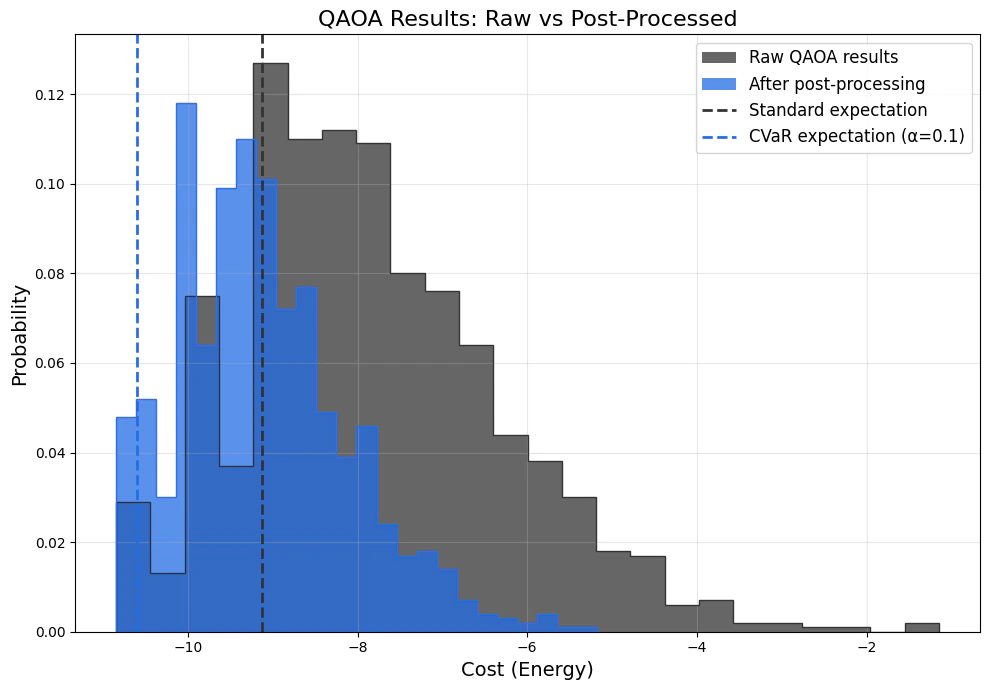
After retrieving the sampled bitstrings from the QPU, you may want to postprocess the results using a classical algorithm (e.g. a local bitflip search):
```python theme={null}
from haiqu.sdk.optimization import cvar_expectation
# Compute raw costs using the QUBO object's .cost() method
# (Qiskit little-endian; no manual bitstring reversal needed).
raw_costs = {bitstring: optimization_problem.cost(bitstring)
for bitstring in raw_counts.keys()}
# Apply server-side postprocessing (bitflip local search, runs on the Haiqu API).
# Returns (processed_costs, processed_counts).
processed_costs, processed_counts = haiqu.postprocess(
counts=raw_counts,
problem=optimization_problem,
postprocess_iterations=5,
)
# CVaR expectation over the raw distribution. alpha=1.0 is the full mean;
# alpha=0.1 averages over the best 10% of samples by cost.
standard_expectation = cvar_expectation(raw_counts, problem=optimization_problem, alpha=1.0)
cvar_10_percent = cvar_expectation(raw_counts, problem=optimization_problem, alpha=0.1)
```
Here is how postprocessing might affect your QPU results: