> ## Documentation Index
> Fetch the complete documentation index at: https://docs.haiqu.ai/llms.txt
> Use this file to discover all available pages before exploring further.
# Experiment Sharing
> Fetch circuits and jobs from existing Haiqu experiments
## How to share experiments
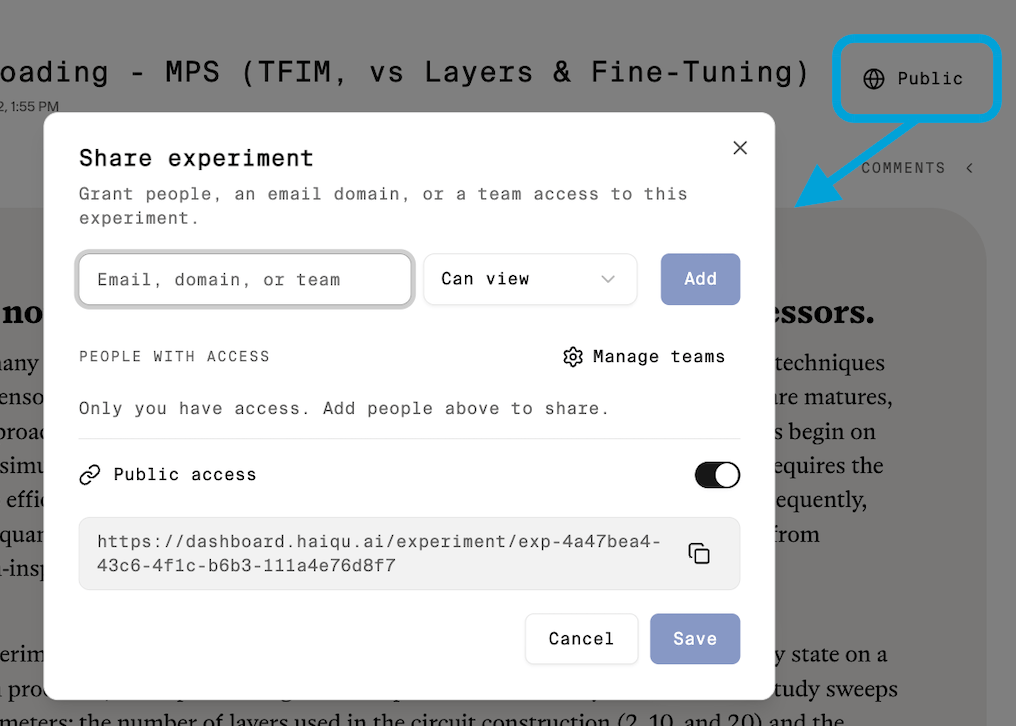
To share an experiment, open the experiment page and click the **Private/Public** sharing button. In the dialog that appears, add your coworker's email address or select a team, then choose the appropriate permission level (view or edit). Shared users will be able to access the experiment according to the permissions you grant, including its jobs, circuits, descriptions.
 ## How to fetch jobs and circuits
In Haiqu, every job and circuit belongs to an experiment. If you've been invited to collaborate on an experiment, you can view and retrieve all of the jobs, circuits, and other assets associated with that experiment, subject to the permissions you've been granted.
```python theme={null}
from dotenv import load_dotenv
from haiqu.sdk import haiqu
load_dotenv()
haiqu.login()
EXPERIMENT_ID = "exp-04ea4655-d5a7-4df5-8d45-d76a65521ce2"
haiqu.init(EXPERIMENT_ID)
```
```python theme={null}
df_jobs = haiqu.list_jobs(experiment_id=EXPERIMENT_ID, widget=False, pandas=True)
```
```python theme={null}
job = haiqu.get_job(jobs[0].id)
job.retrieve_status()
```
```python theme={null}
df_circuits = haiqu.list_circuits(experiment_id=EXPERIMENT_ID, widget=False, pandas=True)
```
```python theme={null}
circuit = haiqu.get_circuit(circuits[0].id)
haiqu.draw(circuit)
```
## Other use-cases
#### List jobs for a circuit
```python theme={null}
haiqu.list_jobs(circuit="", widget=False)
```
#### List circuits from another experiment
```python theme={null}
haiqu.list_circuits(experiment_id=EXPERIMENT_ID, widget=False)
```
## How to fetch jobs and circuits
In Haiqu, every job and circuit belongs to an experiment. If you've been invited to collaborate on an experiment, you can view and retrieve all of the jobs, circuits, and other assets associated with that experiment, subject to the permissions you've been granted.
```python theme={null}
from dotenv import load_dotenv
from haiqu.sdk import haiqu
load_dotenv()
haiqu.login()
EXPERIMENT_ID = "exp-04ea4655-d5a7-4df5-8d45-d76a65521ce2"
haiqu.init(EXPERIMENT_ID)
```
```python theme={null}
df_jobs = haiqu.list_jobs(experiment_id=EXPERIMENT_ID, widget=False, pandas=True)
```
```python theme={null}
job = haiqu.get_job(jobs[0].id)
job.retrieve_status()
```
```python theme={null}
df_circuits = haiqu.list_circuits(experiment_id=EXPERIMENT_ID, widget=False, pandas=True)
```
```python theme={null}
circuit = haiqu.get_circuit(circuits[0].id)
haiqu.draw(circuit)
```
## Other use-cases
#### List jobs for a circuit
```python theme={null}
haiqu.list_jobs(circuit="", widget=False)
```
#### List circuits from another experiment
```python theme={null}
haiqu.list_circuits(experiment_id=EXPERIMENT_ID, widget=False)
```